Cash Flow Analysis Software for Entrepreneurs
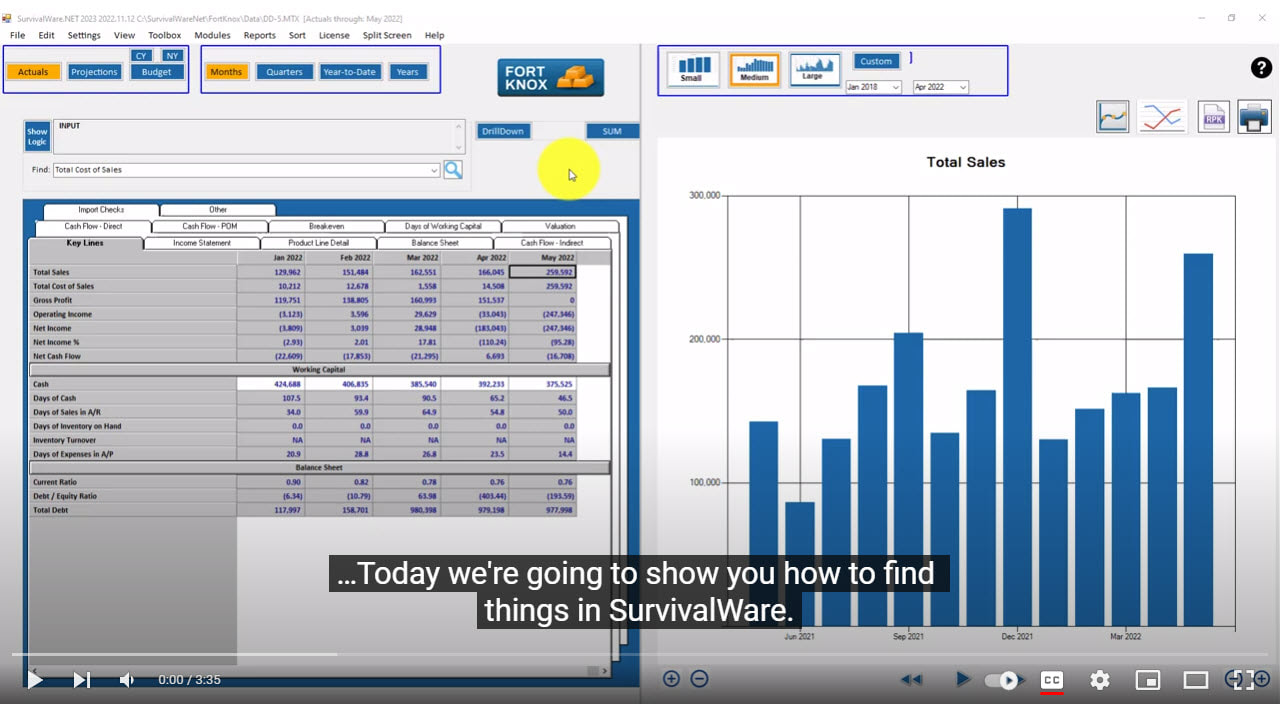
SurvivalWare is a powerful analysis and planning software package that picks up where QuickBooks and Excel leave off. You load data into a SurvivalWare financial model – monthly financial statements, as well as, non-financial data such as leads, customer count, and headcount. The model calculates Key Performance Indicators (KPIs) and financial ratios for the past and present. You can also use the Budgeting and Projections modules to forecast how things look in the future.
That’s all well and good, but even nicer is that we can put you in touch with someone who can help you through the process. Who can help you identify your KPIs, and coach you on how to gather the necessary data efficiently and in a timely manner. Who can show you how to use SurvivalWare as your primary information reference tool. The finger on the pulse of the business.
SurvivalWare is a meaty product. It pays attention to the details of getting data in, making sure it is accurate, and providing information when it is needed in a format that is understood by those who need to know. SurvivalWare includes automation tools so that more experienced users can set up data feeds and special reports that novice users can run.

SurvivalWare has personality. The software and company are unwavering in support of entrepreneurship and free enterprise. We are your biggest cheerleader. We want you to succeed. We love being in business, and working with others who share our enthusiasm. We understand that you go through good times and bad, and want to work with you during either. We are not fair weather software suppliers. For example, the original Cash Planner module is preserved in all its glory and included as standard equipment when you license SurvivalWare. There is someone in the community who can help you use this feature if you find yourself living on the edge, and in need of some precise short term cash management.
SurvivalWare has been designed to work well in communities of small business owners. At the micro level, you might find informal peer groups of 3 to 5 owners. Or maybe a franchise owner with several locations. SurvivalWare helps compare and contrast the group members to each other, using a common set of performance measures. Going up the chain, you might have more formal groups like Vista or the 20 Groups prevalent in the Auto, Truck, and Bus retailing space. Here you’re talking more like 15 or 20 participants. At this level there is often a written agreement required to participate in the group, and you might spend $200 or $300 a month and attend periodic meetings. Vista bundles in monthly coaching sessions, and can cost significantly more.

You may be part of a franchise system consisting of hundreds of similar businesses operated independently. A customized SurvivalWare model helps the franchisor collect financial data in a common format from franchisees who may be using different accounting software and most certainly have evolved away from the official “chart of accounts.” Ranking reports, Company Stats, and the Comparanator really shine in this environment. The franchisor gains a deeper understanding of the range of performance in the system, and the franchisees get solid information on what they are doing right, and where there is room for improvement.
We have put together a free service available to all active support customers that automates the process of sharing performance data for small groups (up to 20 participants). The group sponsor can analyze everyone’s data together to help spotlight best practices, flag problem areas, and stimulate discussion. For this to work, everyone has to have SurvivalWare and be willing to share SurvivalWare data files with the group sponsor (or with each other).
We’re going to do our part to open up to the community. We are publishing the specs (target date: May 15, 2008) on how to develop models in SurvivalWare, and how to customize dashboards and reports. We are publishing the file formats so that you can get in there and make tweaks if you want, or just see how things work. We’ve developed a new automation tool (Rusty’s Command Language) to allow third party developers and technically proficient customers develop their own applications.
We are including an Excel Add-in that allows you to pull data into Excel from a SurvivalWare MTX file. Of course, we don’t know why anyone would ever want to do that. That could be used as a mechanism for getting the data into Crystal XCelsius if that is your thing.
We’re not going to control what you do with the data. We’re just going to try to make it easy to get the data in and good information out.
Check out my blog, “Journey to profits and cash flow,” for the Inside Scoop on SurvivalWare, and topics of interest to the SurvivalWare community.

Come join our community
- Small Business owners
- Entrepreneurs
- Technology helpers
- Accountants and financial analysts in small and medium sized companies
- Trusted advisors (CPA’s, consultants, attorneys)
Download SurvivalWare V. 2.01 for a 30 day free trial:
Click below to sign up for our free e-mail newsletter:
Check out our Recommended Products on Amazon.com
Email: custsupport@survivalware.com